
How it works

From policy to evidence.

Every session follows the same operational loop: policy defines expected behavior → scenario tests the policy → team executes → evidence is produced.

Step 1

Define the procedure.

Define how operational disruptions should be handled. Who owns the response. How escalation works.

Abby analyzes governance documents, identifies gaps, asks targeted questions, and generates enterprise-grade policy drafts. She maps policies to frameworks and converts them into simulation rules.

Policies can also be built directly inside the studio. Either way, the result is a procedure ready to validate.
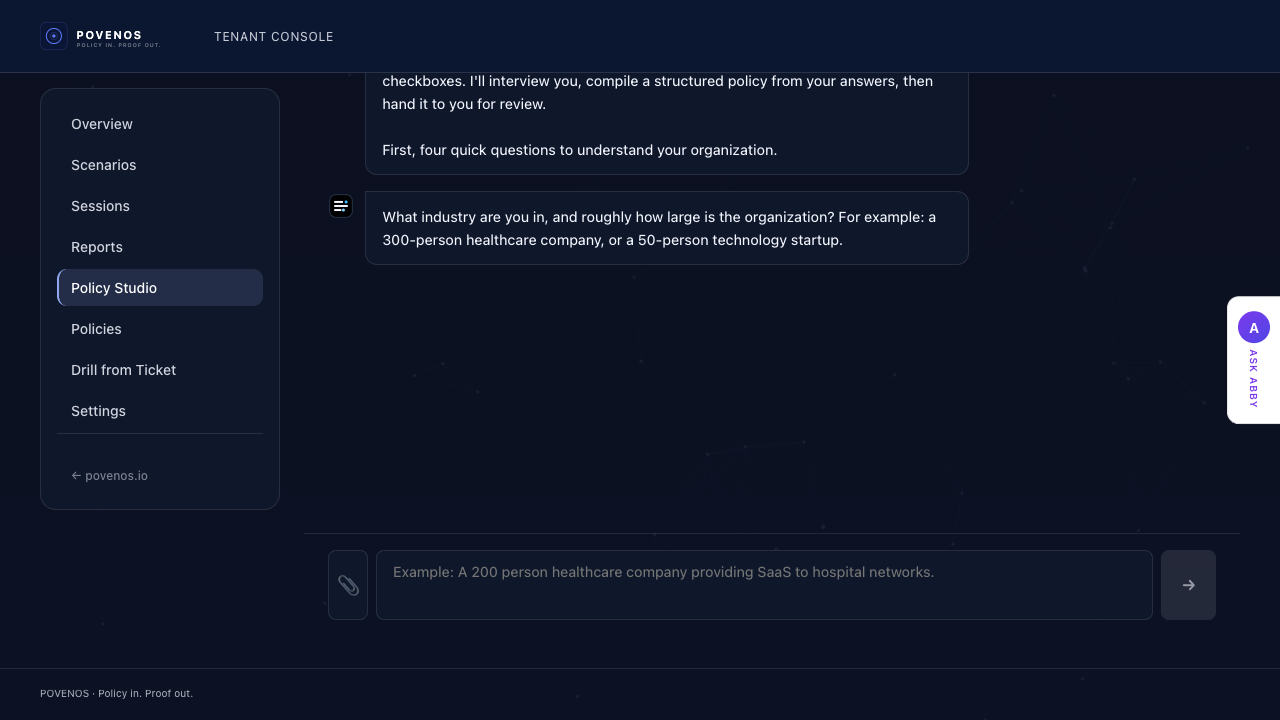
Abby conducting a policy interview in Policy Studio
Abby walks through each area of operational response. The result is a structured policy ready for validation.

Step 2

Launch a scenario.

Choose a scenario from the library, upload a ticket from your ITSM platform, or let the platform generate one.

Scenarios introduce ransomware outbreaks, production outages, data breaches, vendor compromises, and infrastructure failures. They reflect real operational pressure: incomplete information, conflicting signals, and time pressure.

Upload real tickets from ConnectWise, PagerDuty, ServiceNow, or any ITSM platform to convert them into training simulations.

MISSION BRIEFING
API Gateway Outage — Production
SEV-1
YOUR ROLE
Incident Commander
Situation
A monitoring alert has fired indicating elevated error rates on the primary API gateway. Customer support is reporting intermittent 502 errors. Your engineering team is available but not yet engaged.
Known Information
  • Error rate spike began 3 minutes ago
  • Affecting ~15% of requests to primary gateway
  • No recent deployments or infrastructure changes
The briefing screen. Participants see the scenario, their assigned role, and the operational context before the session begins.

Step 3

Team executes in real time.

Participants respond from their operational role (incident commander, engineer, or operations lead), mirroring how disruptions unfold in real organizations.

The platform observes without guiding. Participants are not prompted toward correct answers—Povenos measures actual behavior.

Teams escalate, communicate, and make calls with incomplete information, exactly the conditions they face during real disruptions.

POVENOSTRAININGRansomware Lateral MovementSEV 2
PHASE TRIAGEROLE Team Lead01:08:42
AlertsSignals
8
Credential reuse detected across admin endpoints
T+4minINVESTIGATED
File encryption detected on shared operations drive
T+6minACKNOWLEDGED
Immutable backup jobs lagging on restore window
T+8minNEW
Executive team requests recommendation on response posture
T+10minNEW
1 Decisions
2 Obligations
3 Evidence
4 Impact
5 Team
Decision Required180 SECONDS RESPONSE WINDOW

Confirm customer impact

Based on what the signal shows, what is the user-facing impact right now?

Policy
Confirm and record the user-facing impact before escalating to Major Incident status. Impact must be evidence-based, not assumed.
Confirm customer impact now — based on current signal
Proceeds on available data — scope may refine
Request additional diagnostics before confirming impact
+5 min delay — escalation window narrows
Escalate to Major Incident now — confirm impact after
Policy: impact confirmation required before escalation
Confidence Level
Low
Medium
High
Abby — Policy & Technical Advisor
Major Incident : Impact Classification (ITIL). Confirm and record the user-facing impact before escalating to Major Incident status.
DO
State impact in observable terms. Use the signal evidence — error rates, affected services, and timing — to describe what customers are actually experiencing.
AVOID
Without a confirmed impact statement, severity can't be set, leadership can't be briefed, and every downstream step stalls.
Abby
You are acting as TL. Use Abby for missing evidence, policy constraints, or the next check on Major Incident : Impact Classification (ITIL)
What should I do next?
Am I on track?
Who should I notify?
The command center. Teams receive alerts, escalate, communicate, and make decisions under real conditions.
WORKSPACE
Scenario
API Gateway Outage — SEV-1
Role
Incident Commander
Available Actions
Acknowledge Incident
Begin Investigation
Escalate to Engineering
Initiate Containment
Post Status Update
Collected Evidence
Monitoring Alert
API p99 latency spike
Database Metrics
Connection pool 87%
Customer Impact
14 502 errors/min
The workspace. Participants investigate signals and take containment actions. Everything is timestamped against the active procedure.

Adaptive Pressure

Pressure escalates with the scenario.

Sessions adapt dynamically. Signals arrive in waves, conditions change, and Abby adjusts coaching based on the operator's decisions. The platform creates real urgency without requiring external coordination.

Step 4

The system records execution.

Every action, decision, and delay is timestamped. The system records acknowledgement, escalation timing, policy steps followed or skipped, and coordination failures.

OBLIGATIONS
Progress4 of 7
Acknowledge incident within 5 minutes
completed 2:14
Notify on-call engineering lead
completed 4:33
Post initial status update
completed 6:01
Begin root cause investigation
completed 8:15
Escalate if not contained within 15 minutes
in progress
Post containment verification
locked
Complete after-action report
not started
Each policy requirement is tracked in real time. Completed, missed, and pending steps are visible throughout the session.

Step 5

Evidence is produced.

After the session the platform produces a structured evidence report showing how the response actually unfolded.

Every session reveals gaps: steps skipped, escalations delayed, decisions unclear. These show where written procedure and real execution diverge. The report shows overall performance, execution timeline, which policy steps were followed or skipped, and how this run compares to previous ones.

Leaders can review the timeline. Teams can replay the scenario and see exactly where execution broke down.

Simulation Report
Scenario: Security Incident Response
2026-03-14 · Duration: 42 minutes
87
A
Strong execution. Policy steps followed on time. One escalation delay identified.
Performance Overview
85%
Coverage
6
Participants
What went well
Incident acknowledged within target window
Containment actions executed before customer impact escalated
Stakeholder communication initiated within first 10 minutes
Areas for improvement
Escalation to Engineering Lead delayed by 3 minutes
Status update interval exceeded the 15-minute target
Containment verification step was not completed before resolution
The evidence report is produced automatically. Every decision is available for review, replay, and coaching.

The loop repeats.

Operational readiness is not a one-time event. Organizations can run sessions repeatedly as procedures evolve. Over time sessions create an operational memory showing how response patterns evolve and where recurring gaps appear.

See what the evidence record looks like over time

Operational response procedures are written during calm moments.

Their effectiveness is revealed during chaotic ones. Povenos allows organizations to discover the difference.